Home
How to Choose the Adobe Premiere Pro Video Editing Course That Fits Your Career Goals
Navigating the world of professional video editing requires more than just a creative eye; it demands technical mastery of industry-standard tools. As of late 2026, Adobe Premiere Pro remains a central pillar in film, television, and social media production. However, the sheer volume of adobe premiere pro video editing courses can be overwhelming for beginners and mid-career professionals alike. Whether you are looking for a rapid three-day bootcamp or a deep-dive four-week immersion, selecting the right educational path is the first step toward a successful editing career.
The current educational landscape offers a diverse range of options. For those needing to upskill quickly, programs like the New Horizons Introduction to Premiere Pro provide a concentrated three-day experience. Conversely, aspiring filmmakers often gravitate toward the New York Film Academy (NYFA) 4-Week Online Workshop , which offers approximately 80 hours of instruction and mimics a real-world production environment. Understanding the nuances between these formats—and the hardware required to support them—is essential for any student.
What Are the Top Adobe Premiere Pro Courses Available Right Now?
The market for Premiere Pro training has matured significantly, moving away from generic tutorials toward specialized, project-based learning. Today, the top-rated courses are those that bridge the gap between software mechanics and creative storytelling. For many, the choice comes down to the level of instructor interaction and the specific career outcome desired.
Instructor-led bootcamps are a popular choice for corporate teams and individuals on a tight schedule. New Horizons, for instance, maintains a high standard of instruction, with average instructor ratings reaching 4.8 out of 5 across their technical programs. These courses focus heavily on the "buttons"—the technical workflow of importing, cutting, and exporting. They are highly effective for those who already understand editing theory but need to transition from other software like Final Cut Pro or DaVinci Resolve.
On the other end of the spectrum are intensive workshops like those offered by NYFA. These programs are designed for those who want to enter the industry as professional editors. They provide a comprehensive look at the craft, including screening and critique phases that are vital for developing a professional eye. A significant advantage of high-end workshops is the provision of software; NYFA, for example, provides licenses for Adobe Premiere Pro and Photoshop for the duration of the course, reducing the initial financial barrier for students.
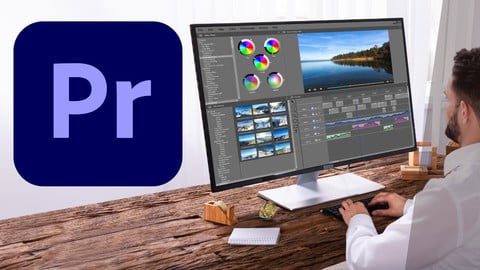
Image source: Udemy
How to Get Professional Training for Free Using Your Local Library
One of the most overlooked resources in the creative industry is the "Library Hack." Many aspiring editors spend hundreds of dollars on introductory courses without realizing that their local public library card may grant them full, free access to premium platforms like LinkedIn Learning (formerly Lynda.com). This resource is particularly valuable given that LinkedIn Learning currently hosts over 2,134 results specifically for Premiere Pro, ranging from absolute beginner guides to advanced color grading masterclasses.
To utilize this resource, you typically follow these steps:
- Visit your local library's website and look for a "Digital Resources" or "E-Learning" section.
- Locate the link for LinkedIn Learning.
- Log in using your library card number and PIN.
- Search for "Premiere Pro Essential Training" to find structured, multi-hour courses that cover the entire software ecosystem.
Community discussions on platforms like Reddit frequently highlight this as the most underutilized free resource for new editors. While these courses are self-paced and lack the direct feedback of an instructor-led workshop, the quality of the content is often on par with paid professional certifications. It is an excellent way to build a foundational knowledge base before investing in a high-cost bootcamp or certification exam.
Do You Actually Need an Adobe Certified Professional Badge to Get Hired?
There is a persistent debate within the editing community regarding the value of official certifications. Adobe heavily markets the Adobe Certified Professional badge as a critical career credential. This digital badge is the only official validation recognized by the software creator, and for entry-level candidates, it can serve as a useful signal to recruiters that you possess a baseline level of technical competency.
However, professional editors often argue that a strong portfolio and "round-tripping" skills—the ability to move projects seamlessly between Premiere Pro, After Effects, and Photoshop—carry far more weight in the hiring process. In the real world, a hiring manager is more likely to be impressed by a well-paced sizzle reel or a complex multi-cam edit than a digital certificate. The consensus among industry veterans is that while certification doesn't hurt, it should never be prioritized over hands-on project experience.
Comparing the Top 5 Premiere Pro Training Programs for 2026
Choosing the right program requires a clear understanding of the trade-offs between price, time, and depth. The following table breaks down the most prominent providers as of late 2026.
| Provider | Price (Approx.) | Duration | Format | Software Incl.? |
|---|---|---|---|---|
| NYFA Online | $1,500 - $2,000 | 4 Weeks | Instructor-Led | Yes |
| New Horizons | $1,195 | 3 Days | Bootcamp | No |
| Coursera (Meta/Adobe) | Subscription | Self-Paced | Modular | No |
| LinkedIn Learning | Free (w/ Library) | Self-Paced | Video Library | No |
| Adobe Official | Varies | Self-Paced | Tutorials | Trial Only |
When evaluating these options, consider the "hidden" costs. A course that includes the software license, like NYFA's, may actually offer better value than a cheaper course that requires you to maintain a $55/month Creative Cloud subscription. Additionally, the 80-hour commitment of a workshop provides significantly more "seat time" than a 3-day sprint, which is vital for muscle memory.
What Hardware Do You Need Before Starting a Premiere Pro Course?
One of the most common pitfalls for new students is the "Hardware Barrier." Premiere Pro is a resource-intensive application, and attempting to learn on an underpowered machine will lead to crashes, playback lag, and frustration. Before enrolling in any adobe premiere pro video editing courses , ensure your system meets the baseline requirements for modern video production.
According to technical guidelines from NYFA, students should prioritize drive speed over total capacity. A slow drive will cause the "playback freeze" issue where the video continues to play audio but the visual frame gets stuck—a common problem reported in the Adobe Community forums. Investing in a fast external SSD is often the single most impactful hardware upgrade a student can make.
How to Fix Common Premiere Pro Crashes and Playback Lags
Even with top-tier hardware, Premiere Pro can occasionally be temperamental. Learning how to troubleshoot these issues is a core skill taught in advanced courses but often skipped in beginner tutorials. The most frequent complaint among students is playback lag, especially when working with high-resolution 4K footage.
The primary solution for this is the Proxy Workflow . Proxies are low-resolution copies of your footage that Premiere uses during the editing process. When you are ready to export, the software automatically switches back to the high-resolution originals. This allows even modest laptops to edit complex projects without stuttering. Additionally, students should get into the habit of clearing their "Media Cache" files weekly. These temporary files can bloat to hundreds of gigabytes, eventually slowing down the entire system.
Another critical setting is RAM allocation. By navigating to Preferences > Memory , you can specify how much of your computer's RAM is dedicated to Adobe applications versus other background tasks. Maximizing this value ensures that Premiere Pro has the resources it needs for real-time rendering and smooth timeline scrubbing.
Why You Should Learn AI Powered Tools Like Morph Cut Early On
The landscape of video editing is shifting rapidly with the integration of artificial intelligence. Modern courses now emphasize AI-powered tools that significantly reduce the time spent on tedious tasks. One such tool is Morph Cut , a notably innovative transition effect that uses face tracking and frame interpolation to hide jump cuts in interviews. Instead of covering a cut with B-roll, Morph Cut can often create a seamless transition between two different takes.
Furthermore, advanced workflows now incorporate third-party AI plugins like Autocut, which can automatically remove silences and "um/ah" sounds from raw footage. While these tools do not replace the creative decision-making of an editor, they allow professionals to focus on the "art" of the edit rather than the mechanical cleanup. According to Editors Keys , mastering these advanced techniques is what separates a hobbyist from a high-earning professional in the current market.
Which Course Path Matches Your Specific Editing Goals?
The Career Starter
For those aiming for a staff position at a creative agency or production house. Focus on structured paths that offer official validation.
- Adobe Official Certification
- Coursera Specializations
- Focus on "Round-tripping" skills
The Niche Creator
For YouTubers and social media managers who need fast, modular learning for specific platforms.
- LinkedIn Learning modules
- YouTube-specific workflows
- Focus on AI speed tools
The Professional Pivot for Mid-Career Creatives
If you are transitioning from a related field—such as graphic design or photography—into video editing, your needs are unique. You likely already understand color theory and composition but lack the technical workflow of a non-linear editor (NLE). For this group, intensive, instructor-led workshops like NYFA’s are often the most effective. These programs provide the necessary "immersion" to break old habits and adopt professional-grade organization and naming conventions, which are vital when working in collaborative environments.
Frequently Asked Questions
Key Takeaways for Choosing Your Course
- Check your local library first for free access to premium LinkedIn Learning content.
- Prioritize drive speed by ensuring you have a 7,200 rpm HDD or a high-speed SSD before starting.
- Decide your focus between a "Certification" path for resumes or a "Portfolio" path for creative roles.
- Master the Proxy workflow early to avoid the common playback lag issues found in high-res editing.
- Look for software provision in high-end courses to offset the cost of the Creative Cloud subscription.
- Integrate AI tools like Morph Cut to stay competitive in the modern, fast-paced editing market.
Start by verifying your library's digital portal today to see if you can begin your professional training for free.