Home
Where to Find Top-Rated Editable Book Templates for Classroom Projects and Professional Self-Publishing
What Exactly Defines an Editable Book Template
An editable book is essentially a "container" for content that allows users to modify text, images, and layout without building the underlying structure from scratch. In the modern digital landscape, these templates serve three primary audiences: educators, aspiring authors, and business owners looking to leverage Private Label Rights (PLR) content.
For teachers, an editable book often takes the form of a "name book" or a seasonal mini-book. These are designed to be printed and folded, helping young learners practice literacy skills. According to Twinkl , these templates are vital pedagogical tools that help children organize information and focus on specific creative tasks rather than struggling with page layout.
For authors, the "editable" aspect refers to manuscript frameworks. These templates come pre-loaded with industry-standard margins, font styles, and front matter (like title pages and tables of contents). Using a template ensures that the final file meets the strict requirements of platforms like Amazon Kindle Direct Publishing (KDP) or IngramSpark. As noted by Template.net , these frameworks provide a professional foundation that saves hours of manual formatting.
How to Choose the Right Editable Format for Your Specific Project
Selecting the correct file format is the most critical decision in the book-making process. The wrong choice can lead to hours of wasted effort when your layout breaks during export or printing.
The Educator’s Choice: PDF and Microsoft Word
Teachers often require high-speed customization. PDF templates with form fields allow for quick name entry, while Word documents are ideal for "foldable" mini-books. These formats are widely accessible and print reliably on standard classroom equipment. If you are creating a simple classroom resource, these formats are often the most efficient path forward.
The Author’s Choice: Reedsy or Word for KDP
If your goal is self-publishing, compatibility is king. Reedsy Studio offers a web-based environment that exports directly to EPUB and print-ready PDF. Microsoft Word remains a popular choice because of its deep feature set, though it requires careful use of "Styles" to ensure the layout doesn't shift during the conversion process. Many authors find that starting in Word and moving to a dedicated typesetter later provides a balanced workflow.
The Designer’s Choice: Canva or InDesign
For image-heavy projects like children's picture books, cookbooks, or magazines, visual control is paramount. Canva has emerged as a top-tier option for non-designers due to its drag-and-drop interface. However, for high-end professional publishing, Adobe InDesign remains the industry standard, offering precise control over typography and "full-bleed" image placement.
Comparison of the Most Popular Platforms for Editable Books
To help you decide which tool fits your needs, we have analyzed the leading platforms based on their primary use case, ease of use, and cost as of late 2026.
| Platform | Best For | Ease of Use | Export Formats | Cost |
|---|---|---|---|---|
| Canva | Visual Layouts | 5/5 | PDF, JPG, PNG | Free / Pro |
| Microsoft Word | Manuscripts | 4/5 | DOCX, PDF | Subscription |
| Reedsy Studio | Self-Publishing | 4/5 | EPUB, PDF | Free |
| Blurb BookWright | Photo Books | 3/5 | PDF, Print | Free Tool |
| Adobe InDesign | Professional Design | 1/5 | All Industry Types | Subscription |
Top-Rated Editable Name Books and Resources for Early Educators
In early childhood education, personalized resources significantly increase student engagement. Editable name books allow teachers to generate custom practice materials where a child's name appears on every page, often accompanied by phonetic illustrations.
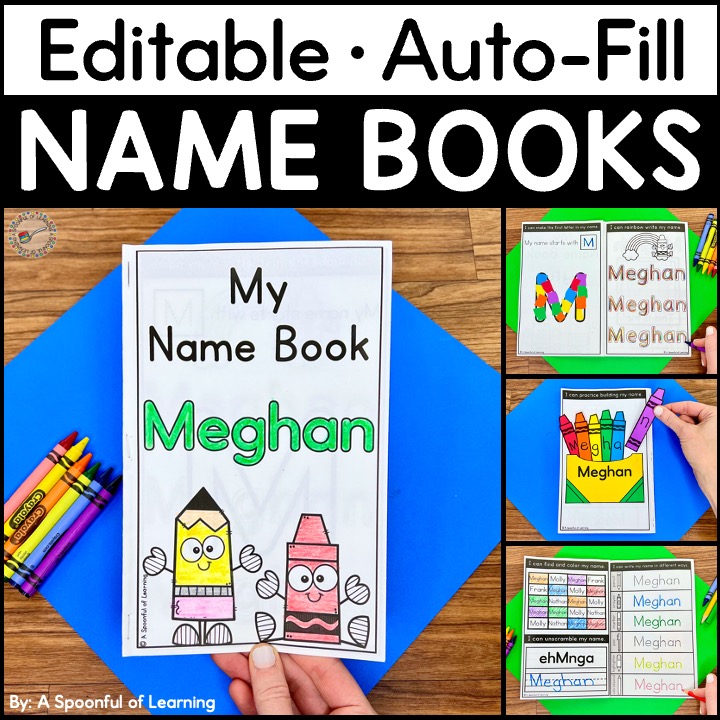
Image source: A Spoonful of Learning
According to Play to Learn Preschool , these automated templates can generate a full class set of books in minutes. The process typically involves typing a student list into a master form, which then populates individual pages with the correct letters and corresponding images (e.g., "A is for Apple" if the name starts with A).
Beyond name books, "Mini-Books" are a staple of the K-2 classroom. These are often one-page templates that, when folded correctly, create an 8-page booklet. Premium versions of these templates, often found on marketplaces like Teachers Pay Teachers, typically range from $3.99 to $4.00. They cover seasonal themes, science observations, and creative writing prompts, providing a tactile way for children to showcase their learning.
Professional Formatting Standards for Creating Editable Manuscripts
When moving from a simple document to a professional book, you must adhere to specific industry standards. A template is only as good as the settings applied to it. If you are preparing a book for physical print, understanding trim sizes and margins is non-negotiable.
Standard Trim Sizes
The "trim size" is the final physical dimension of your book. While you can technically choose any size, sticking to standards ensures lower printing costs and better shelf fit. Common US sizes include:
- Trade (6" x 9"): The most common size for non-fiction and hardcovers.
- Pocket (4.25" x 6.87"): Standard for mass-market paperbacks.
- Square (8.5" x 8.5"): Popular for children's books and photography portfolios.
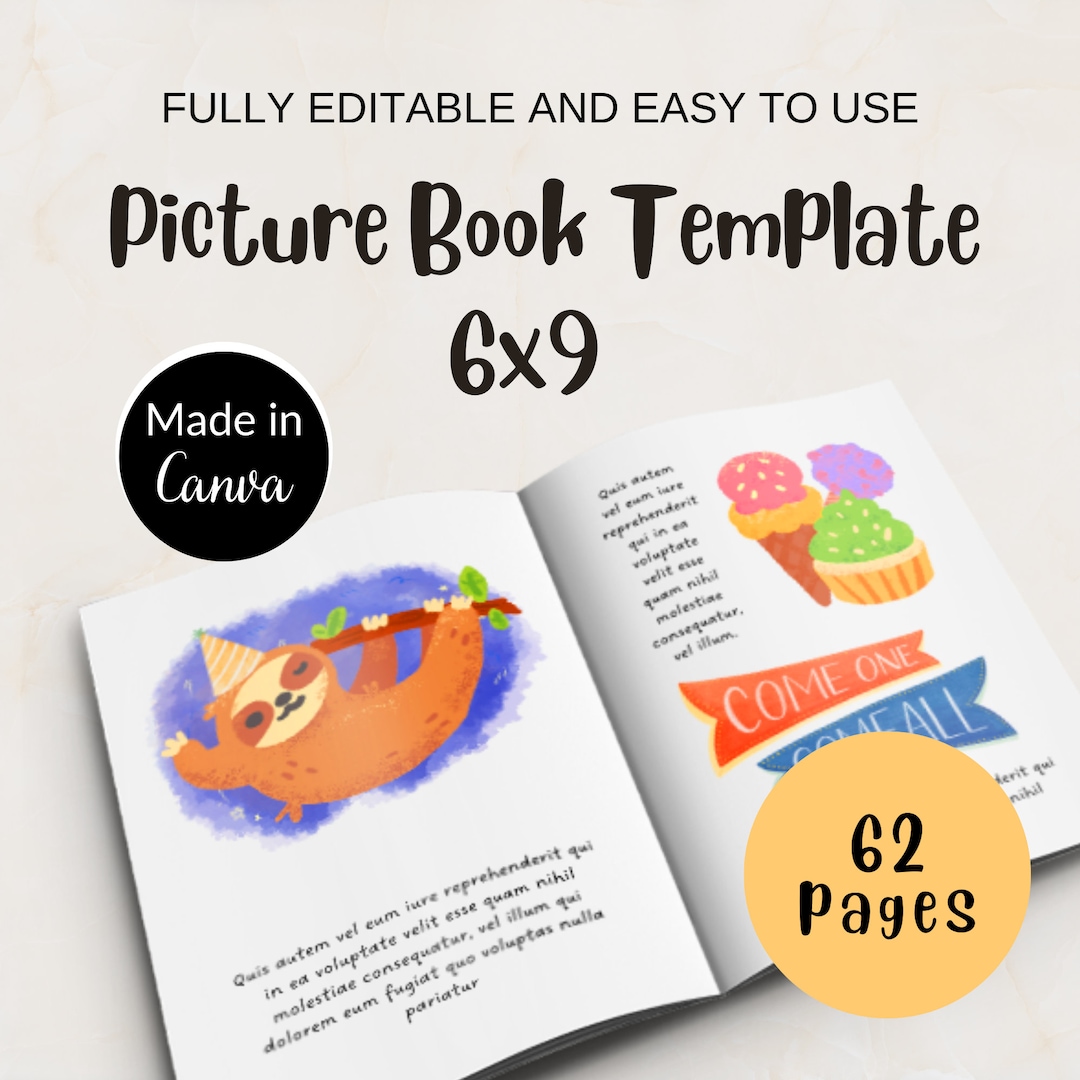
Image source: Etsy
Essential Front and Back Matter
A professional editable book must include more than just the story. Ensure your template has placeholders for:
- Title Page: Includes title, subtitle, and author name.
- Copyright Page: Essential for legal protection and ISBN listing.
- Table of Contents (TOC): Must be hyperlinked for digital editions.
- Gutter Margins: The extra space on the inside of the page to account for the book's binding.
How to Use the Snowflake Method to Structure Your Book Content
Editing a book isn't just about the visual template; it's about the structural integrity of the content. The Snowflake Method , developed by Randy Ingermanson, is a highly effective way to "edit" your book from a single idea into a full manuscript.
According to Advanced Fiction Writing , the process follows these steps:
- The One-Sentence Summary: Write a single sentence that describes your entire book. Avoid character names; focus on the conflict.
- The One-Paragraph Expansion: Expand that sentence into a paragraph describing the setup, major disasters, and the ending.
- Character Synopses: Create a one-page document for each major character, detailing their motivations, goals, and "epiphany" moment.
- The Four-Page Synopsis: Expand your one-paragraph summary into a four-page narrative. This becomes your "editable" roadmap.
By using this method within your editable template, you ensure that the content is as polished as the layout.
The Hybrid Workflow for Achieving a Professional Finish
Many users struggle because they try to do everything in one tool. A "Hybrid Approach" often yields the highest quality results by utilizing the strengths of different platforms at different stages of the project.
Use Word for the initial writing phase. Its spell-check, track changes, and "Styles" features are exceptionally strong for managing raw text.
Import your clean Word document into Reedsy. This tool handles the complex CSS required for industry-standard headers, footers, and chapter starts with one click.
Create your book cover and any interior illustrations in Canva. Export these as high-resolution (300 DPI) files to ensure they don't appear blurry when printed.
Use the Blurb PDF Uploader to combine your interior and cover files. This platform provides professional-grade paper and binding options that far exceed standard office printing.
Understanding the Private Label Rights Gap in Editable Content
A growing trend in the "editable books" space is Private Label Rights (PLR) . Unlike a blank template, a PLR book comes with the text already written. You purchase the rights to edit the content, put your name on it, and sell it as your own.
However, there is a significant quality gap in the PLR market. Many "ready-to-go" books are generated by AI or low-quality content mills. To make PLR content valuable, you must "re-skin" it. This involves:
- Rewriting the Introduction: Add your unique voice and personal anecdotes.
- Updating Statistics: Ensure any data points are current for 2026.
- Customizing the Design: Never use the stock cover that comes with a PLR package. Use a Canva template to create something unique to your brand.
By treating PLR as a "rough draft" rather than a finished product, you can produce high-quality assets in a fraction of the time it takes to write from scratch.
Common Technical Hurdles and How to Resolve Them
Working with editable templates often presents technical challenges that can stall a project. Addressing these early can save significant frustration.
The "Address Book" Search Confusion
A common pitfall when searching for "editable books" is ending up in technical support forums for Mozilla Thunderbird. As noted by Mozilla Support , users often struggle with "Address Books" that become locked or uneditable due to browser extensions or network sync issues. If you find yourself in a forum discussing "LDAP servers" or "MAB files," you have strayed into email management territory and should refine your search to "book formatting templates."
ID Attribute Errors in Digital Books
For those building digital or web-based books using HTML/CSS, a frequent error occurs during the assignment of "ID attributes." According to
freeCodeCamp
, failing to assign a unique
id
to specific book elements (like
id="chapter-one"
) can break navigation and styling. Always ensure your digital templates use unique identifiers for every major section.
Word Layout Breaks During Export
Microsoft Word is notorious for shifting images and text when converting to PDF. To fix this, always use "Page Breaks" instead of hitting the Enter key multiple times. Additionally, ensure all images are set to "In Line with Text" or "Top and Bottom" wrapping to prevent them from floating to random pages during the export process.
Frequently Asked Questions About Editable Books
Key Takeaways for Choosing and Using Editable Book Templates
Navigating the world of editable books requires matching your creative goals with the right technical tools. Whether you are a teacher or a self-published author, these takeaways will help you succeed:
- Match the format to the goal: Use PDF for classroom printables, Word for manuscripts, and Canva for visual design.
- Prioritize industry standards: Always check your trim sizes and gutter margins before you start writing to avoid costly re-formatting later.
- Leverage automated tools: Educators should look for templates that auto-populate student names to save hours of manual work.
- Use the Hybrid Workflow: Don't be afraid to move between tools—draft in Word, typeset in Reedsy, and design covers in Canva.
- Troubleshoot early: Be aware of common technical hurdles like ID attribute errors in digital books and the "Address Book" search confusion.
- Verify licenses: Always ensure you have the commercial rights to sell any content created from a third-party template.
Start your next project by downloading a standard 6" x 9" template and applying the Snowflake Method to build a structurally sound manuscript from day one.