Home
What Is Legal Size Paper and How Do You Use It Correctly?
Legal size paper measures 8.5 x 14 inches (215.9 x 355.6 mm). It is three inches longer than standard Letter paper, providing extra space for lengthy contract clauses and multiple signature lines. While many modern offices are shifting toward 8.5 x 11 inches for easier digital scanning, legal size remains a top choice for real estate deeds, wills, and specific court filings where document integrity is paramount.
Understanding the Standard Dimensions of Legal Size Paper
Legal size paper is a staple of North American administrative and judicial systems. Defined by the American National Standards Institute (ANSI), it is officially categorized as ANSI Legal . Unlike the international ISO standards used in Europe and Asia, ANSI standards focus on inch-based increments that have historically served the needs of U.S. and Canadian businesses.
The physical dimensions are precisely 8.5 inches wide by 14 inches long. In the metric system, this translates to 215.9 mm by 355.6 mm. For digital professionals, understanding these dimensions in pixels is crucial for maintaining high-resolution output. At a standard print resolution of 300 DPI (dots per inch), a legal-sized document requires a canvas of 2550 x 4200 pixels . If you are working in points, the dimensions are 612 x 1008 pts.
According to ABM College , these dimensions were established to create consistency across government agencies. The extra length is not merely aesthetic; it serves a functional purpose in document density. By providing 27% more vertical space than a standard Letter sheet, legal paper allows for complex agreements to be contained on fewer sheets, which historically reduced the risk of pages being lost or surreptitiously swapped during the signing process.
Legal vs. Letter vs. A4 Paper — Which One Do You Need?
Choosing the correct paper format is essential for professional presentation and hardware compatibility. The three most common formats encountered in a modern office are Letter, Legal, and A4. While they may look similar at a glance, their aspect ratios and regional applications differ significantly.
Letter Size (8.5 x 11 inches): This is the standard for almost all business correspondence in the United States and Canada. It is wider in proportion to its height compared to Legal paper, making it feel more balanced for standard letters and reports.
Legal Size (8.5 x 14 inches): As noted by Bindertek , the primary difference is the three-inch height advantage. This "skinnier" aspect ratio is specifically tailored for documents that require extensive footers, multiple witness signature blocks, or long-form accounting columns.
A4 Size (8.3 x 11.7 inches): This is the international standard (ISO 216). It is narrower than both Letter and Legal paper but slightly taller than Letter. If you are sending documents to Europe or Asia, A4 is the expected format. Using Legal paper for international correspondence can lead to significant formatting issues, as most international printers are not equipped with 14-inch trays.
| Format | Dimensions (Inches) | Dimensions (mm) | Primary Use Case |
|---|---|---|---|
| Letter | 8.5 x 11 | 215.9 x 279.4 | General Business |
| Legal | 8.5 x 14 | 215.9 x 355.6 | Contracts & Deeds |
| A4 | 8.3 x 11.7 | 210 x 297 | International Standard |
| Tabloid | 11 x 17 | 279.4 x 431.8 | Newsletters & Maps |
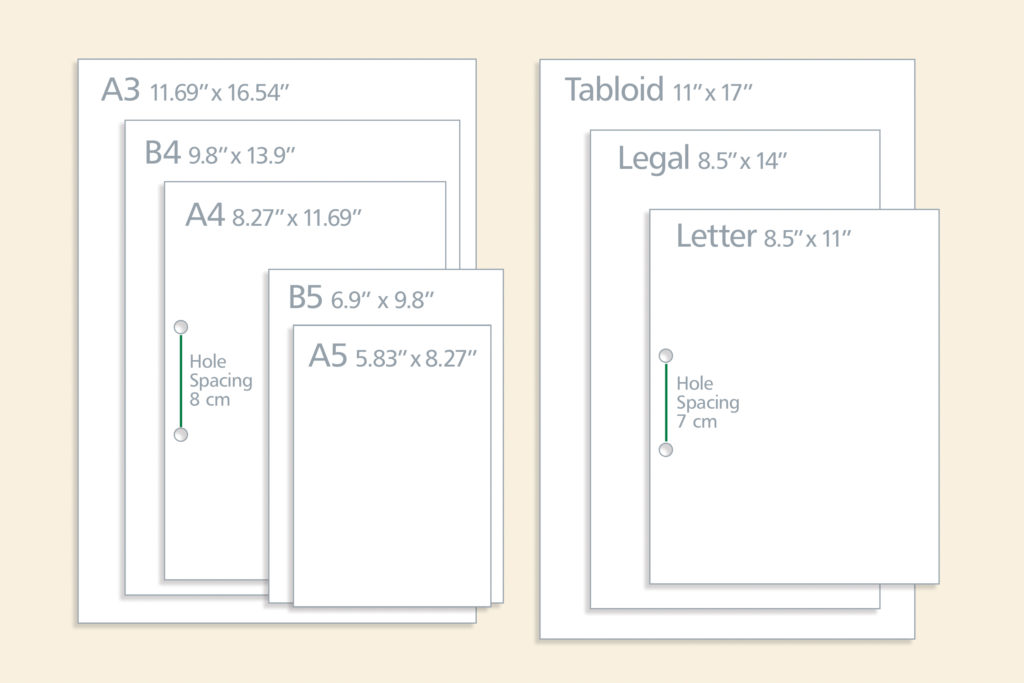
Image source: Bindertek
Why Is Legal Paper 14 Inches Long?
The origins of the 14-inch length are rooted in industrial efficiency rather than arbitrary choice. In the early 20th century, the paper manufacturing process relied on large master sheets that were cut down to size. In 1921, the U.S. Bureau of Standards conducted a study to minimize waste in the paper industry.
The Bureau of Standards identified that a 17 x 28-inch commercial sheet was a standard production size. By folding this sheet twice, manufacturers could produce four legal-sized sheets (8.5 x 14) with zero scrap material. This made legal paper a highly cost-effective option for mass production.
Lawyers favored the longer format because it allowed them to keep lengthy, uninterrupted clauses on a single page. In an era before digital stapling and secure PDFs, keeping a contract on a single sheet of paper was a security measure against tampering.
Many people confuse Legal paper with "Foolscap." However, Foolscap is a traditional British size (roughly 8 x 13 inches) named after a jester's cap watermark. While Legal paper eventually replaced Foolscap in North America, they are technically distinct standards.
Today, the 14-inch length persists largely due to tradition and the specific requirements of "wet signatures." Many legal documents, such as mortgages and last wills, require multiple signatures and notary seals on the final page. The extra three inches provide the necessary "real estate" to accommodate these marks without pushing the text onto a new, vulnerable page.
How to Print Legal Size Paper Without Errors
Printing on legal paper is one of the most common sources of frustration in a modern office. Most errors stem from a mismatch between the physical printer tray and the software settings. To ensure a successful print, you must address both the hardware and the software.
Adjusting the Physical Tray
Most standard office printers have a "universal" tray that defaults to Letter size. To accommodate legal paper, you must manually extend the tray. Look for a small plastic latch or toggle (often blue or green) at the back of the tray. Pressing this latch allows the tray to slide outward, adding the necessary three inches of length. If the tray is not extended, the printer's sensors will detect a "Paper Mismatch" or "Size Error."
The "3-Inch Cutoff" Landscape Fix
A frequent technical issue occurs when printing in landscape mode: the printer leaves the leftmost three inches of the page blank. This happens because the printer driver still thinks it is handling an 11-inch sheet. According to troubleshooting guides from the Lucid Community , the fix involves two steps:
- Software Margins: In your document settings (Word, Google Docs, or Lucidchart), set your margins to "Zero" or "Narrow."
- Print Dialog: In the print preview window, select "Fit to Page" or "Scale to Fit." This forces the driver to override its hard-coded internal margins and utilize the full 14-inch length.
Advanced PDF Workflows for Notaries and Legal Assistants
Notaries and legal assistants often face the "Mixed-Size PDF" problem. A single loan package might contain 80 pages of Letter-sized documents and 20 pages of Legal-sized deeds. If you simply hit "Print," the printer may try to force everything onto one paper size, resulting in cut-off text or shrunk images.
The Adobe Acrobat Thumbnail Hack
To handle mixed packages efficiently, use the Page Thumbnails pane in Adobe Acrobat. By expanding this pane, you can visually identify the longer 14-inch pages. You can then use the `Ctrl+Select` command to highlight only the legal pages and send them to the legal tray in one batch, followed by a separate run for the letter pages. This ensures that every document maintains its intended scale and integrity.
Mac vs. Windows Compatibility
Technical distinctions between operating systems can complicate legal printing. Windows users typically benefit from PCL6 drivers that handle tray switching more reliably. Mac users, however, often encounter driver limitations within the macOS print subsystem that ignore the "Choose paper source by PDF page size" setting. In these cases, Mac users may need to manually split the PDF into two files—one for Letter and one for Legal—to ensure the printer pulls from the correct tray.
What to Look for When Buying Legal Size Paper
Not all legal paper is created equal. When shopping for supplies, you should look beyond the "Legal" label and evaluate the technical specifications of the paper to ensure it meets your firm's standards.
Weight and GSM
Paper weight determines the "feel" and durability of the document.
- 20 lb (75 GSM): Standard copy paper. Suitable for internal drafts and high-volume printing.
- 24 lb (90 GSM): Professional correspondence. This is widely considered a top choice for contracts as it feels more substantial and resists ink bleed-through.
- 28 lb - 32 lb: Heavyweight. Used for premium documents like wills or formal certificates that need to last for decades.
Brightness and Sustainability
Brightness is measured on a scale of 1 to 100. A brightness of 92 is standard, while 97-100 provides a high-contrast, "ultra-white" finish that makes text pop. Additionally, look for the FSC (Forest Stewardship Council) or GreenCircle certification. These labels ensure that the paper was sourced from responsibly managed forests, which is increasingly important for corporate social responsibility (CSR) compliance in modern law firms.
Yes, but a standard #10 business envelope (4.125 x 9.5 inches) will require an extra fold compared to Letter paper. While Letter paper is typically folded into thirds, Legal paper usually requires a four-panel fold or a specialized "Legal Envelope" to avoid excessive bulk. For formal legal service, using a dedicated 9 x 15-inch flat envelope is often recommended to keep the document pristine.
Most flatbed scanners found on home "all-in-one" printers are limited to 11.7 inches (A4/Letter). To scan legal paper, you generally need a printer equipped with an Automatic Document Feeder (ADF) that supports 14-inch lengths. Before purchasing a scanner for a law office, always verify that the ADF specifications explicitly list "Legal" as a supported size.
This error usually occurs because the software is set to "Legal" but the printer tray hasn't been physically extended, or the tray's internal sensors haven't registered the change. Ensure the tray latch is clicked into the "LG" or "Legal" position. If the hardware is correct, check your Print Properties to ensure the "Manual Feed" or "Tray 2" settings match the physical location of the paper.
No. Legal paper is 8.5 x 14 inches, while A4 is 8.3 x 11.7 inches. Legal paper is significantly longer and slightly wider. They are not interchangeable; if you try to print an A4 document on Legal paper without adjusting settings, you will end up with large white margins at the bottom and potentially cut-off text on the sides.
For documents intended for long-term storage and frequent handling, a 24 lb or 32 lb bond paper is highly recommended. These weights offer better resistance to tearing and yellowing over time. Many estate attorneys also prefer "cotton bond" paper, which contains a percentage of cotton fiber for a distinctive texture and exceptional longevity.
Key Takeaways for Managing Legal Paper
While the digital revolution has pushed many industries toward the 8.5 x 11-inch Letter standard, legal size paper remains an essential tool for document integrity and complex contracting.
- Confirm the dimensions of 8.5 x 14 inches (215.9 x 355.6 mm) before starting your design.
- Extend your printer tray manually using the internal latch to avoid "Paper Mismatch" errors.
- Fix landscape cutoff issues by setting software margins to zero and using the "Fit to Page" print setting.
- Use Adobe Thumbnails to quickly identify and batch-print legal pages within mixed PDF packages.
- Select 24 lb weight or higher for permanent records to ensure durability and a professional feel.
- Check ADF compatibility on your scanner to ensure it can handle the 14-inch length without jamming.
To ensure your documents are professional and compliant, always verify the specific filing requirements of your local jurisdiction before choosing between Letter and Legal formats.