Home
Which SendGrid Alternative Should You Choose After the Free Tier Removal?
For most developers, Postmark stands out as a top choice for transactional reliability, while Mailgun offers a strong alternative for those needing granular API control. If cost is your primary driver, Amazon SES ranks among the most affordable options, though it requires significant technical expertise. For those missing SendGrid's old free tier, MailerSend and Brevo provide accessible entry points with generous starting plans.
Why are so many developers and businesses leaving SendGrid?
In recent years, the landscape of cloud-based email delivery has shifted dramatically. Once the undisputed leader for developer-friendly SMTP, SendGrid has faced growing criticism following its acquisition by Twilio. The most immediate catalyst for the current exodus was the removal of the "Forever Free" plan, which previously allowed small projects to send up to 100 emails per day at no cost. According to discussions on the Cloudron forum , this change alienated a massive segment of the developer community who relied on the service for low-volume alerts and side projects.
Beyond pricing, the "Support Loop" has become a critical pain point. Many users report a frustrating cycle where an account is flagged for "manual review" or suspended by automated systems, yet the user cannot log in to open a support ticket. This catch-22 situation has led many to seek providers with more transparent human intervention. Furthermore, the post-acquisition focus appears to have shifted toward high-end enterprise marketing suites, often at the expense of the core API stability and UI simplicity that originally made SendGrid popular.
Deliverability is another growing concern. As one of the largest senders in the world, SendGrid's shared IP pools are frequently targeted by bad actors. While SendGrid works hard to mitigate this, the sheer volume makes it difficult to maintain the pristine reputation that smaller, more specialized providers can offer. For businesses where every transactional email is mission-critical, the risk of landing in the spam folder due to a neighbor's poor sending habits is no longer acceptable.
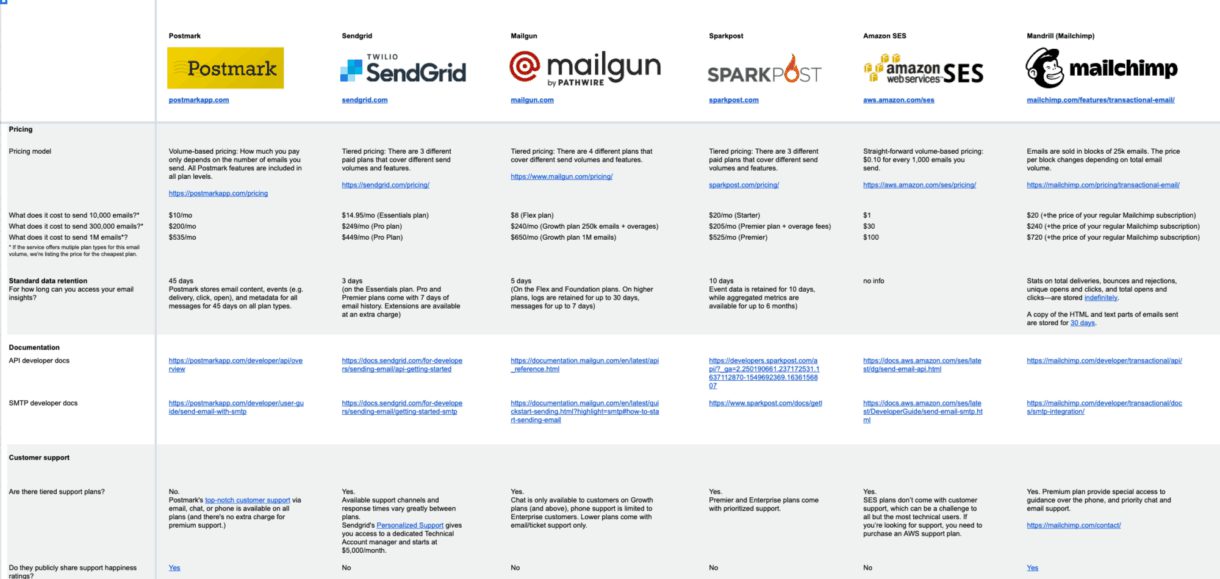
Image source: Postmark
The top SendGrid alternatives for transactional email and APIs
Postmark: A High Standard for Speed and Reliability
Postmark is widely regarded as one of the strongest options for developers who prioritize inbox placement above all else. Unlike SendGrid, which mixes marketing and transactional mail on the same infrastructure, Postmark enforces a strict separation. This policy ensures that your critical password resets and invoices aren't delayed by someone else's massive Black Friday newsletter. Data suggests that Postmark can offer up to a 22.3% better inbox placement rate compared to SendGrid, according to comparative deliverability studies .
Mailgun: The Developer’s Choice for Granular Control
For teams that need deep technical insights, Mailgun ranks among the top contenders. It provides exceptionally strong logging and search capabilities, allowing developers to track the exact path of an email through the system. Mailgun’s API is notably flexible, offering advanced routing rules and suppression management that many find superior to SendGrid’s current implementation. It is a popular choice for complex integrations where programmatic control over every aspect of the sending process is required.
ZeptoMail by Zoho: The Budget-Friendly Specialist
If you are looking for a dedicated transactional service that won't break the bank, ZeptoMail is a significant advancement in the low-cost sector. With pricing starting at approximately $12.50 for 50,000 emails, it offers a notable price advantage over SendGrid’s Essentials plan. ZeptoMail maintains high deliverability by strictly prohibiting marketing content, ensuring their IP reputation remains high. According to Zoho's official documentation , this focus makes them a top-tier choice for SaaS applications and e-commerce platforms.
MailerSend: The Modern Contender with 24/7 Support
MailerSend has emerged as a strong alternative for those who feel neglected by SendGrid’s support team. They offer a generous free tier of 3,000 emails per month, which serves as an excellent bridge for users who were displaced by SendGrid's recent policy changes. Their platform is built with a modern, intuitive UI that simplifies the process of creating templates and managing domains. As noted in MailerSend's comparison analysis , their 24/7 support is a major differentiator for businesses that cannot afford downtime.
How to choose the right provider for your specific needs
Selecting a SendGrid alternative isn't just about finding the lowest price; it's about matching the tool to your specific sending profile. A small bootstrapper has very different needs than a high-volume enterprise or a cold outreach specialist.
| User Profile | Recommended Tool | Key Reason | Starting Price |
|---|---|---|---|
| Small Bootstrapper | Brevo / MailerSend | Generous free tiers | Free / $0 |
| High-Volume Enterprise | Mailgun | Advanced API & Logs | $35/mo |
| Deliverability Focused | Postmark | Transactional-only IPs | $15/mo |
| Budget-Conscious Dev | Amazon SES | Lowest cost per 1k | $0.10/1k |
One of the most common mistakes users make is failing to distinguish between transactional and marketing mail. Transactional emails (receipts, alerts, password resets) are expected by the user and have high engagement. Marketing emails (newsletters, promotions) are often unsolicited and carry a higher risk of being marked as spam. If you mix these two, your transactional mail may suffer. Providers like Postmark and ZeptoMail solve this by only allowing transactional mail, which sets a high standard for their overall IP health.
Technical hurdles you must clear when migrating from SendGrid
Migrating your email infrastructure involves more than just swapping an API key. There are several technical traps that can stop your emails in their tracks if you aren't prepared.
When you initiate the migration, it is highly recommended to perform a "dual-send" period. Keep your SendGrid account active while you route a small percentage of traffic through your new provider. This allows you to monitor logs for any unexpected bounces or blocks before fully committing your entire volume to the new service.
Is Amazon SES the cheapest SendGrid alternative?
Amazon Simple Email Service (SES) is frequently cited as the most cost-effective SendGrid alternative, with a price point of just $0.10 per 1,000 emails. For a business sending 100,000 emails a month, the cost would be roughly $10, compared to $20-$35 on other platforms. However, this low price comes with a steep learning curve.
SES is not a "plug-and-play" solution. You must manage your own suppression lists, handle bounce notifications via Amazon SNS, and manually request to be moved out of the "Sandbox" environment. Furthermore, some developers have reported that SES can be slower when using standard SMTP compared to specialized providers. To achieve high-volume performance, you typically need to use the AWS SDK and implement your own batching logic. For teams already embedded in the AWS ecosystem, SES is an excellent choice, but for those seeking a simple dashboard and easy setup, the hidden costs of developer time may outweigh the monthly savings.
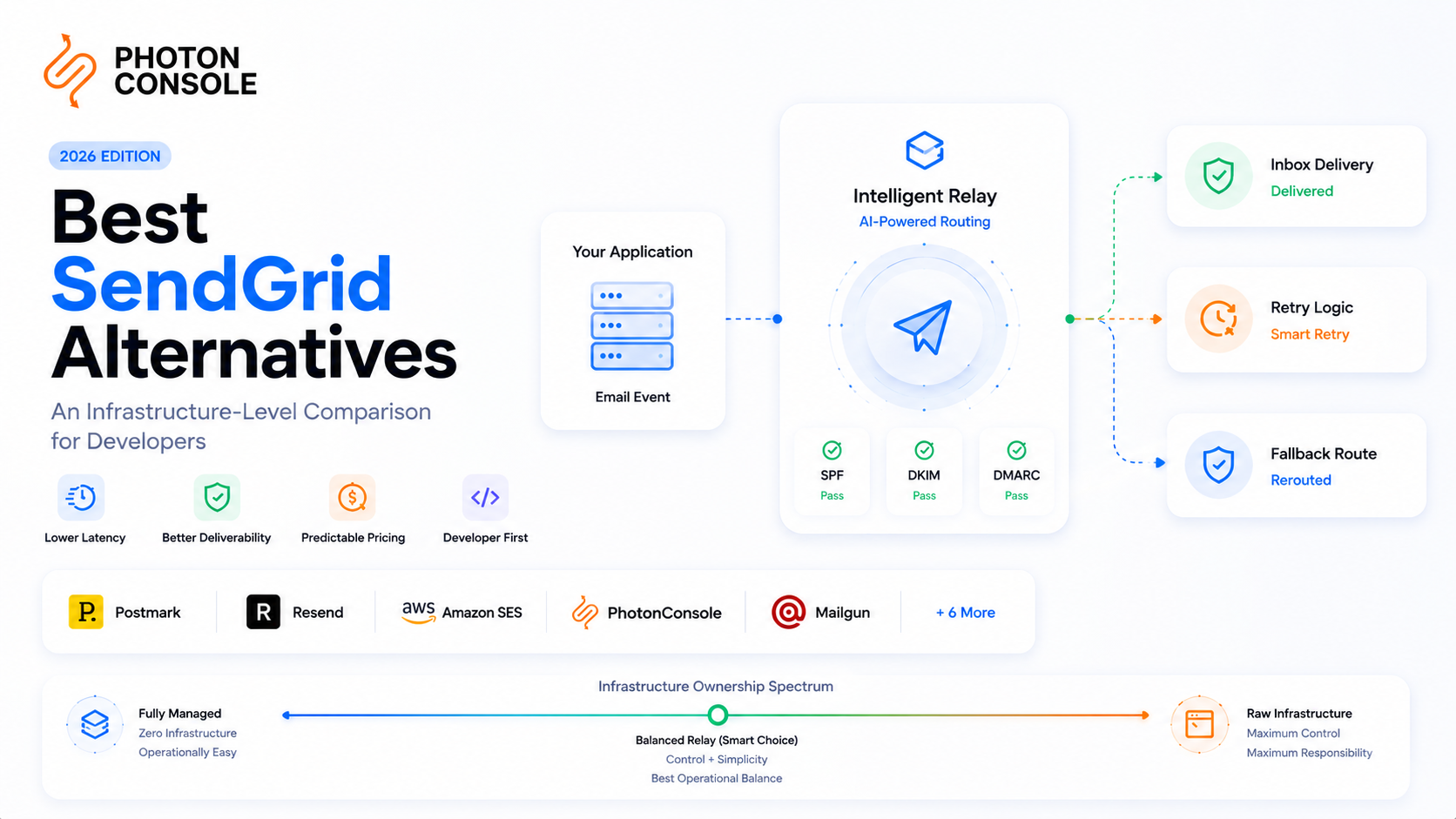
Image source: Photon Console
How to avoid account suspension during your migration
One of the most common reasons users leave SendGrid is due to sudden, unexplained account suspensions. Unfortunately, new accounts at any provider are subject to intense scrutiny. To avoid being flagged as a potential spammer, follow this pre-migration checklist:
- Export your suppression lists: Before you close your SendGrid account, export your list of unsubscribes and bounces. Import these into your new provider immediately to ensure you don't accidentally email someone who has already opted out.
- Verify your domain identity: Don't just verify a single email address. Verify your entire domain using DKIM to show the provider you have full control over the sending source.
- Warm up your IP: If you are moving to a dedicated IP, start with low volumes (e.g., 50 emails per hour) and gradually increase over two weeks. Even on shared IPs, a sudden spike of 50,000 emails from a brand-new account will trigger fraud alerts.
- Provide context: When signing up, be specific about what you are sending. "Transactional alerts for our SaaS app" is much better than "Business emails."
Open-source and self-hosted alternatives for total control
For those who want to escape the cycle of third-party pricing changes and TOS updates, self-hosting is a viable, albeit complex, path. Postal is widely regarded as one of the top open-source mail servers available today. It provides a full-featured web interface and API that mimics the experience of a paid service like SendGrid.
However, self-hosting your own mail server comes with a significant maintenance burden. You are responsible for managing IP reputation, handling blacklists, and ensuring 24/7 uptime. A popular middle ground, as suggested in Mailtrap's guide to alternatives , is to use an open-source front-end like Postal but route the actual delivery through a reliable SMTP relay like SMTP2GO. This gives you the control of a self-hosted dashboard with the deliverability of a managed network.
Frequently Asked Questions
Key Takeaways for Finding a Reliable Email Partner
The transition away from SendGrid is a significant step, but it offers an opportunity to improve your application's deliverability and reduce long-term costs. Here is how to ensure a successful move:
- Prioritize deliverability over price: A cheaper service that lands in spam is more expensive in the long run due to lost customers and missed alerts.
- Use API over SMTP: Whenever possible, use the provider's native API to benefit from faster sending speeds and better error handling.
- Separate your traffic: Keep your marketing newsletters and transactional alerts on separate subdomains (e.g., mail.example.com vs. app.example.com) to protect your core reputation.
- Audit your DNS: Ensure your SPF, DKIM, and DMARC records are perfectly configured before sending your first production email.
- Export your data early: Don't wait for a suspension to export your suppression lists; keep regular backups of your bounce and unsubscribe data.
- Test your ports: Avoid Port 25 on cloud hosting environments; use Port 587 or 2525 to ensure your SMTP connections aren't blocked by your ISP.
Start your migration by testing one of these alternatives with a small subset of your traffic to verify deliverability in your specific region.