Home
Which Google Trends Alternatives Give You the Most Accurate Search Data?
While Google Trends is a powerful tool for identifying relative interest, it lacks absolute search volume and real-time social data. For 2026, Glimpse stands out as a top choice for overlaying hard numbers on Google data, while Exploding Topics is widely regarded as one of the best for early trend discovery. If you need to track visibility in AI search engines like ChatGPT, tools like Quaro are becoming essential for modern Generative Engine Optimization (GEO).
Why Google Trends Might Be Misleading Your Strategy
Google Trends has long been the standard for monitoring what the world is searching for, but relying on it exclusively can lead to strategic blind spots. The most significant hurdle for marketers is the 0–100 relative scale . This index does not represent the total number of searches; rather, it shows interest relative to the highest point on the chart for a given region and time. Without knowing if "100" represents 1,000 searches or 1,000,000, it is difficult to calculate potential ROI or market size.
Furthermore, Google Trends operates on a sampling model. According to Google Search Central documentation , the data is a random sample of search requests, which is then anonymized and categorized. While this is sufficient for broad cultural shifts, it often results in a "Long-Tail Blind Spot." Emerging niche keywords or specific product models frequently trigger a "not enough data" message, even when they are generating significant traffic and conversions in real-world sales.
Data latency is another concern. While Google Trends offers a "Past hour" view, the categorization of new viral phenomena can sometimes lag. For businesses in fast-moving sectors like fashion or consumer electronics, waiting for a trend to stabilize on Google can mean missing the initial wave of interest that often peaks first on social media platforms.
How to Get Absolute Search Volume Numbers
To move beyond relative indices, you need tools that bridge the gap between Google's first-party trends and actual search counts. These alternatives typically use a combination of clickstream data and API integrations to provide a more granular view of the market.
Glimpse: The Search Volume Overlay
Glimpse is a notably innovative Chrome extension that transforms the standard Google Trends interface. Instead of a simple 0–100 line, Glimpse overlays absolute search volume directly onto the chart. This allows you to see exactly how many people are searching for a term each month. According to Glimpse's internal data , their forecasting models offer high accuracy for predicting search demand over the next 12 months.
Beyond volume, Glimpse provides a "Topic Map" feature. This visualization helps you identify related niches and "surrounding" trends that you might have missed. For example, if you search for "electric bikes," Glimpse might highlight a surging interest in "fat tire e-bike conversion kits," a specific long-tail opportunity that standard Trends might aggregate into a broader category.
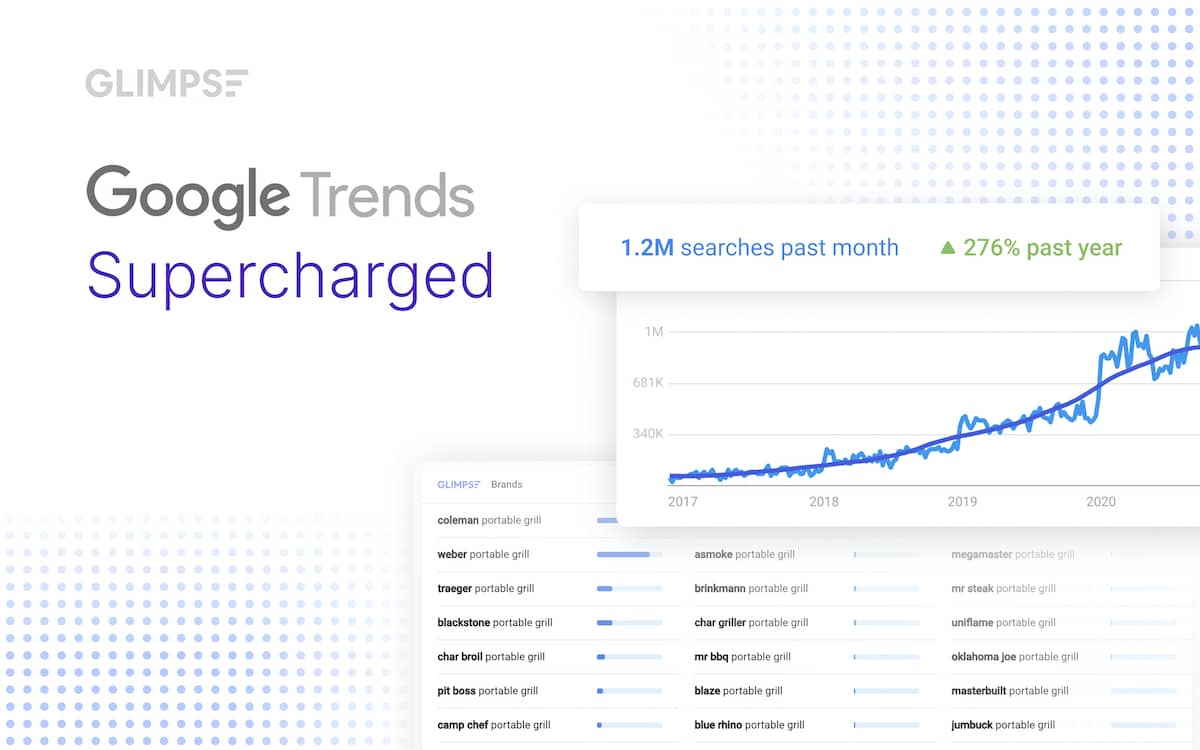
Image source: Glimpse
Keywords Everywhere: The Budget-Friendly Alternative
For users who do not require deep predictive analytics but still need hard numbers, Keywords Everywhere is a popular choice. At a low entry cost (starting around $1.25 per month for credits), it provides search volume, CPC, and competition data directly in the Google search results and on the Google Trends page. It is a highly efficient way to validate the scale of a trend without a significant monthly subscription.
KeywordTool.io: Beyond the Google Ecosystem
One of the strongest arguments for using KeywordTool.io is its ability to scrape autocomplete data from platforms Google Trends ignores. While Google focuses on its own search engine and YouTube, KeywordTool.io provides data for Bing, Amazon, eBay, and even the App Store. This is essential for e-commerce sellers who need to know what is trending specifically on shopping platforms rather than general information-seeking search engines.
Best Tools for Early Trend Discovery and Forecasting
Catching a trend before it reaches its peak is the "holy grail" of content marketing and product development. While Google Trends is reactive, these tools are designed to be proactive.
Exploding Topics: Finding Trends Before They Peak
Exploding Topics uses a proprietary algorithm to scan millions of data points across the web, identifying topics that are showing early signs of exponential growth. Unlike Google Trends, which requires you to already know the keyword you are looking for, Exploding Topics presents you with a curated list of "under the radar" trends across categories like technology, health, and business. It is a top-tier option for venture capitalists and content creators looking for the "next big thing."
Pinterest Predicts: The Leading Indicator
Pinterest is often described as a "visual discovery engine" rather than a social network. Because users use Pinterest to plan for the future (weddings, home renovations, seasonal wardrobes), the platform's data acts as a leading indicator. According to Pinterest's own reporting , their annual "Pinterest Predicts" report has a high track record of accuracy, with 80% of their predicted trends continuing to grow throughout the year. With over 480 million monthly active users, it is an exceptionally strong source for lifestyle and aesthetic trends.
Tracking Trends in the Age of AI and LLMs
As we move through 2026, search behavior is shifting from traditional "ten blue links" to "answer engines" like ChatGPT, Gemini, and Perplexity. This has given rise to Generative Engine Optimization (GEO) .
Quaro and the Shift to GEO
Traditional tools cannot tell you if your brand or a specific topic is being recommended by an LLM. Quaro is among the first tools to address this gap, allowing marketers to track their visibility within AI responses. As users increasingly ask AI for recommendations (e.g., "What are the top-rated ergonomic chairs for back pain?"), tracking whether your product is part of the AI's training set or real-time retrieval is becoming as important as ranking #1 on Google.
Mindverse: AI Sentiment in Niche Markets
For those operating in the European market, Mindverse offers specialized AI-driven trend analysis for German-language texts. It goes beyond simple keyword counting to analyze the sentiment and context of trends within news articles and social discussions. This level of linguistic nuance is a significant step forward for regional marketing teams who find global tools too broad for their specific needs.
Social-First Alternatives for E-commerce and Fashion
In 2026, the lifecycle of a trend often begins on short-form video platforms. By the time a topic reaches significant volume on Google Search, the "early adopter" phase has already passed.
A product or concept goes viral on TikTok or Instagram Reels via a specific influencer node.
Users move to Google to find where to buy the product or learn more about the concept. This is when it appears in Google Trends.
Traditional SEO tools (Semrush/Ahrefs) update their monthly volume estimates to reflect the spike.
TikTok Creative Center
The TikTok Creative Center is a goldmine for e-commerce trends. The "Keyword Insights" and "Top Ads" tools allow you to see which products are currently being promoted and which hashtags are gaining momentum in real-time. If you see a specific ingredient in skincare trending on TikTok, you can bet it will see a search volume increase on Google within 48 hours.
Trendsmap: Real-Time Localized News
For news organizations and PR professionals, Trendsmap provides a visual map of what is trending on X (formerly Twitter) at a local level. While Google Trends can show you what a country is searching for, Trendsmap can show you what a specific city is talking about in real-time. This is a popular choice for catching breaking news stories before they hit the mainstream search cycle.
Traditional SEO Tools for Competitor Trend Analysis
While tools like Glimpse focus on the *topic*, traditional SEO suites like Semrush and Ahrefs focus on the *competition*. These tools are essential for understanding how to monetize a trend once it has been identified.
Semrush vs. Ahrefs: The Data Latency Debate
Both Semrush and Ahrefs use clickstream data—information gathered from millions of internet users who have opted into data-sharing panels. This provides a different perspective than Google's first-party data. As noted in discussions among SEO professionals , clickstream data can sometimes conflict with Google Trends because it represents a specific sample of the population rather than the entire search engine user base.
A common criticism of these large suites is latency. For example, during the initial explosion of ChatGPT, some tools reportedly showed zero search volume for the term for several weeks because their databases only update on a monthly cycle. However, for long-term trend analysis and "Keyword Gap" research—seeing which trends your competitors are ranking for that you are not—these tools remain highly competitive.
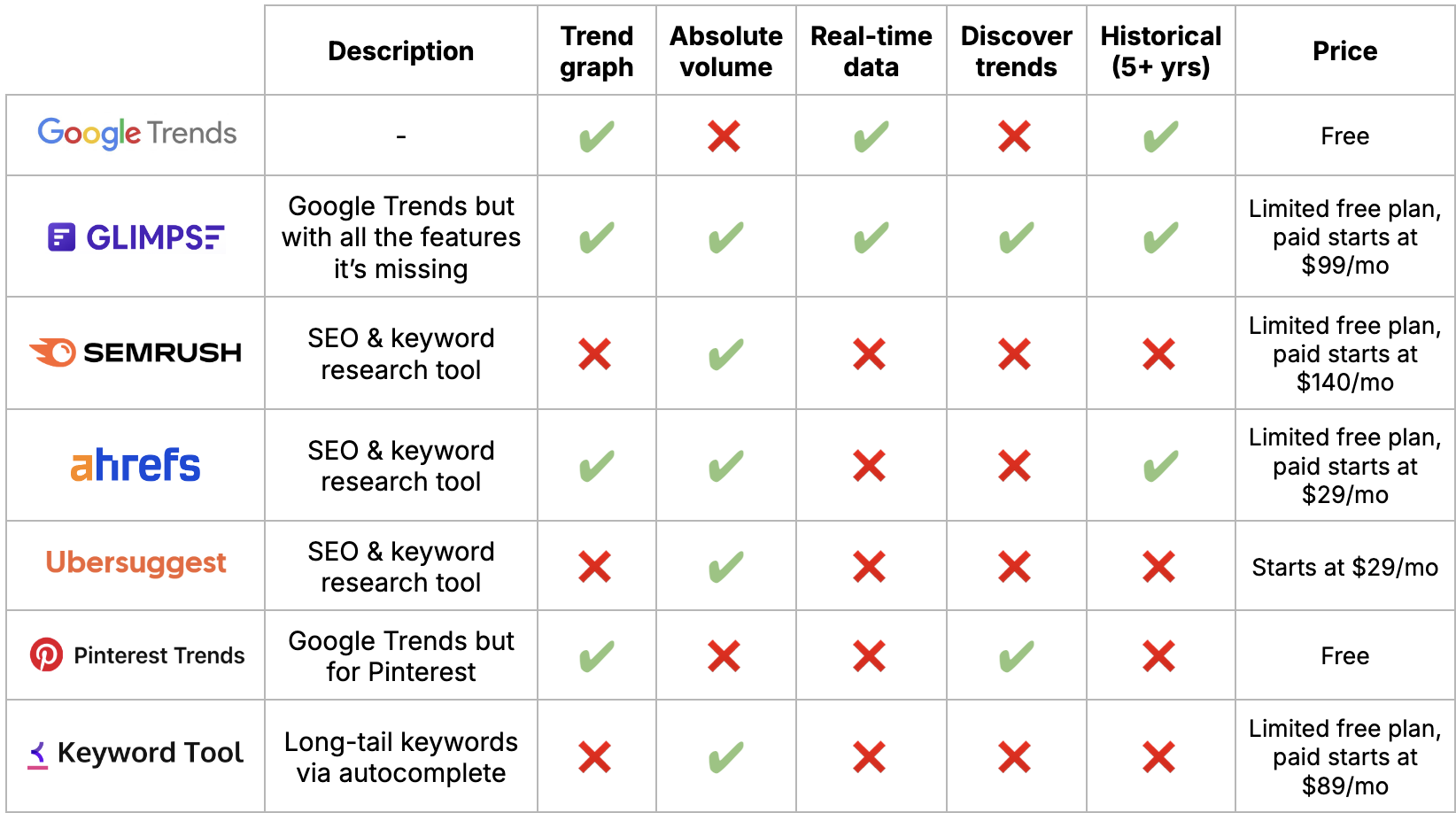
Image source: Glimpse
The Power-User Workflow: How to Combine Tools for Maximum Insight
No single tool provides a complete picture of the market. The most successful marketers in 2026 use a multi-step workflow to discover, validate, and execute on trends.
- Step 1: Discovery (The "Seed" Phase) — Use Pinterest Predicts or Exploding Topics to find ideas that are in the early growth stage. Look for topics with low current search volume but high social momentum.
- Step 2: Validation (The "Hard Numbers" Phase) — Take those seed ideas to Glimpse . Check the absolute search volume to ensure there is a large enough audience to justify the effort. Look at the 12-month forecast to ensure the trend isn't a "flash in the pan."
- Step 3: Competitor Gap (The "Monetization" Phase) — Enter the validated keywords into Ahrefs or Semrush . See who is currently ranking for these terms. If the "Keyword Difficulty" (KD) is low but the volume is high, you have found a high-value opportunity.
- Step 4: AI Visibility (The "Future-Proofing" Phase) — Use Quaro to see if AI engines are already citing sources for this topic. If not, you have an opportunity to become the "authoritative source" that LLMs cite in their answers.
Comparison Table: Which Tool Should You Choose?
Choosing the right alternative depends on your specific goals—whether you need hard numbers for a client report or early signals for a new product launch.
| Tool Name | Primary Strength | Data Source | Best For |
|---|---|---|---|
| Glimpse | Absolute Volume Overlay | Google API + Clickstream | Market Sizing & Forecasting |
| Exploding Topics | Early Trend Detection | Proprietary Algorithm | Product R&D / Content Ideas |
| Pinterest Trends | Visual/Lifestyle Leads | First-Party (Pinterest) | Fashion, Decor, E-commerce |
| KeywordTool.io | Multi-Platform Scraper | Autocomplete (Amazon/eBay) | Marketplace Sellers |
| Quaro | AI Search Visibility | LLM Response Tracking | GEO & Future-Proofing |
| Trendsmap | Hyper-Local Real-Time | X (Twitter) Firehose | News & Viral PR |
Frequently Asked Questions
Yes, several free options exist, though they often focus on specific platforms. Pinterest Trends and the TikTok Creative Center are excellent free resources for social-first data. For search-specific data, the free version of AnswerThePublic provides a limited number of daily searches to visualize the questions people are asking around a topic, which can be a strong starting point for content planning.
The discrepancy arises from how the data is collected. Google Trends uses a direct sample of its own search logs (first-party data). Tools like Semrush and Ahrefs primarily use clickstream data from third-party panels. Because these panels may not perfectly represent the entire global population, and because Google "buckets" or anonymizes certain data, the numbers will rarely match exactly. Most experts suggest using Trends for direction and SEO tools for competitive benchmarking.
KeywordTool.io and Helium 10 are generally considered top choices for Amazon. Unlike Google Trends, which tracks general information-seeking behavior, these tools focus on "buyer intent" keywords. They scrape the Amazon autocomplete bar to show exactly what shoppers are typing when they are ready to make a purchase, which is often very different from what they search for on Google.
Google does not provide an official, public API for Trends. However, several third-party providers like DataForSEO and SE Ranking offer "Trends API" services that scrape or aggregate this data for you. These are essential for developers building custom market-monitoring dashboards or internal tools that require automated trend updates without manual exports.
Google Trends allows you to filter by "Subregion" and sometimes "City," but the data can be sparse for smaller locations. For more granular, real-time local data, Trendsmap is a superior choice. It uses geographic data from social media posts to show exactly what is trending in specific neighborhoods or cities, making it a favorite for local news outlets and event promoters.
The Bottom Line
- Google Trends is for direction; alternatives are for precision. Use Trends to see where the wind is blowing, but use tools like Glimpse to measure the wind speed.
- Overlay absolute volume for better ROI calculations. Tools like Keywords Everywhere or Glimpse remove the guesswork of the 0–100 scale.
- Catch trends early on social media. Pinterest and TikTok are leading indicators that often predict search spikes weeks or months in advance.
- Don't ignore the shift to AI search. As of 2026, tracking your visibility in LLMs via tools like Quaro is a critical component of a modern SEO strategy.
- Use a multi-tool workflow. Combine discovery tools (Exploding Topics) with validation tools (Glimpse) and execution tools (Ahrefs) for a complete strategy.
Start by installing a volume overlay extension today to immediately add more depth to your existing Google Trends research.